Look, you want to know how old a domain is, right?
Simple.
So, let’s get straight to it.
Why Domain Age Matters (and Why You Should Care)
First off, why even bother checking a domain’s age?
Here’s the deal:
- SEO Authority: Older domains often have more established backlink profiles and content history. This can give them a boost in search engine rankings.
- Due Diligence: Knowing a domain’s age is crucial if you’re buying it. You don’t want to inherit a domain with a shady past or penalties.
- Competitive Analysis: Checking competitor domain ages can give you insights into their SEO strategy and how long they’ve been playing the game.
Basically, age is a factor. Not the only factor, but a factor.
Don’t ignore it.
How to Check Domain Age Using WHOIS
Now, the meat of the matter.
WHOIS is your go-to tool.
It’s a public database that provides information about registered domain names.
Here’s how to use it:
- Find a WHOIS Lookup Tool:
- There are tons of free WHOIS lookup tools online.
- Examples include:
- ICANN Lookup (official): https://lookup.icann.org/
- Whois.is: https://whois.is/
- DomainTools https://whois.domaintools.com/
- Enter the Domain Name:
- Type the domain name you want to check into the search bar.
- Hit “Search” or “Lookup.”
- Find the “Creation Date” or “Registered On” Field:
- The WHOIS results will display various information about the domain.
- Look for the “Creation Date,” “Registered On,” or similar field.
- This date tells you when the domain was first registered.
- Calculate the Domain Age:
- Subtract the creation date from the current date.
- That’s your domain age.
Example:
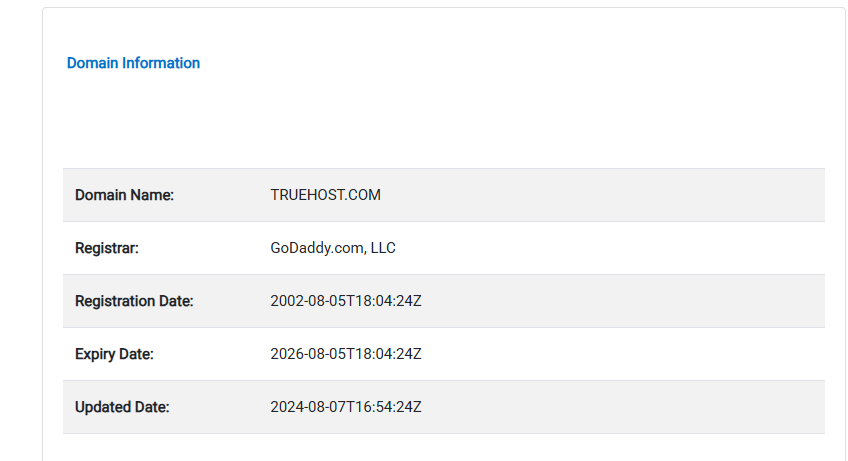
Let’s say the creation date is “2010-05-15.”
Today’s date is “2024-10-26”.
The domain age is roughly 14 years.
Simple math.
Other Important WHOIS Details Beyond Age
Look, while you’re there, don’t just grab the age and run.
Take a few extra seconds to look for these details.
- Registrar: Who registered the domain. This can tell you about the domain’s history.
- Name Servers: These indicate where the domain’s DNS is hosted.
- Contact Information: While often masked for privacy, sometimes you’ll find contact info.
Why This Matters for SEO
Here’s where it clicks for your business.
- Acquiring Domains: Before buying a domain, check its age and history. You don’t want a domain with a bad reputation.
- Building Backlinks: Older domains are often seen as more authoritative. Target them for backlink opportunities.
- Content Strategy: If your competitors have older domains, you might need a more aggressive content strategy to catch up.
- Expired Domains: Use WHOIS to find expired domains, then analyze age and backlink profiles. You can often buy them and redirect them to your site for a boost.
Actionable Steps
- Check Your Own Domain Age: Know where you stand.
- Analyze Competitor Domains: See how you stack up.
- Use WHOIS for Due Diligence: Before buying any domain, check the age and history.
- Incorporate Domain Age Into Your SEO Strategy: It’s one piece of the puzzle.
Tools Recommendation
- Ahrefs: For in depth backlink analysis and domain metrics.
- SEMrush: For comprehensive SEO analysis, including domain age and authority.
- Google Search Console: For monitoring your own website’s performance and identifying potential issues.
Conclusion
Don’t overthink it.
Checking domain age is a simple process.
But it can give you valuable insights.
Use WHOIS.
Do your homework.
And keep grinding.
That’s how you win.
Read also:

With over 10 years of deep-sector experience in domain name lifecycle management and DNS architecture, David Murimi stands as a leading technical authority in the domain industry. Currently serving as a Systems Administrator at Truehost Cloud, David oversees the intricate infrastructure that powers thousands of global digital identities.
Areas of Expertise
- WHOIS Infrastructure: Deep understanding of the WHOIS protocol (RFC 3912), data privacy standards, and the transition toward RDAP (Registration Data Access Protocol).
- DNS Architecture: Specialist in managing authoritative name servers, DNSSEC implementation, and troubleshooting complex propagation issues. Protocol Management: Comprehensive knowledge of EPP (Extensible Provisioning Protocol) and the regulatory frameworks governing gTLDs and ccTLDs.
- Systems Administration: Expert-level management of high-availability hosting environments and domain registrar backends.
Authoritative Contributions
David’s writing focuses on demystifying the “back-end” of the internet.
His articles provide actionable insights into:
- Navigating WHOIS Privacy: Analyzing the impact of GDPR on public registration data.
- Protocol Evolution: Practical guides on moving from legacy WHOIS to modern directory services.
- Security & Compliance: Best practices for protecting domain assets against hijacking and DNS cache poisoning.
Through his work at Truehost Cloud, David continues to bridge the gap between complex network protocols and the end-user experience, ensuring that domain management remains secure, transparent, and efficient.